Skip to content
Sign in

Put AI agents to work. Keep every one in check.

Start with 100 ready-designed Microsoft agents for ten departments. Agent Governance then finds every agent in your company, ours and the ones your people build in Copilot Studio or Foundry, tells you in plain words which are risky, and makes sure new ones are approved before anyone builds them.

100 agents, 10 departmentsMicrosoft Copilot StudioMicrosoft FoundryMicrosoft Entra ID
governance.loyalbytes / homeExample data
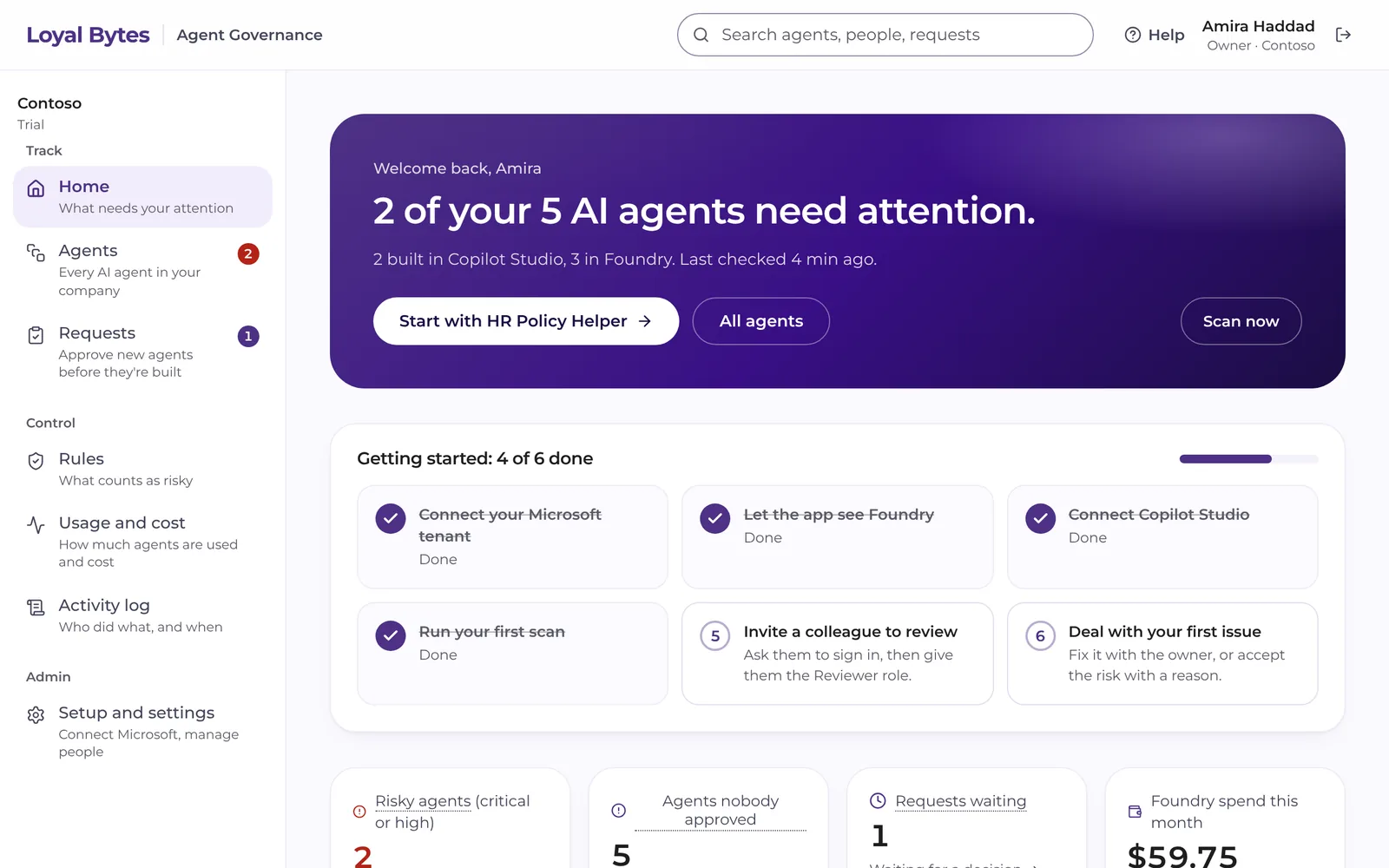
The Home page: a sentence saying 2 of 5 AI agents need attention, a button to start with the riskiest agent, a getting-started checklist, and counts of risky agents, unapproved agents, waiting requests and monthly spend.

One platform for the whole life of an AI agent

Most companies either have no agents yet or have more than they know about. Loyal Bytes covers both: agents designed and ready to deploy, and the governance to keep every agent safe, approved and paid for. Switch between the two from the side panel.

AI Worker

100 agents, ready to put to work

A catalogue of agents designed for ten departments, from HR and Finance to IT, Legal and Operations, tailored to your systems and languages, including Arabic.

  • 50 Copilot agents people use every day in Teams, Outlook and Word
  • 50 Copilot Studio agents that run whole processes, with people approving sensitive steps
  • Engineered, tested and released through GitHub, Dev to Test to Prod
Explore the catalogue
Agent Governance

Every agent, found and kept in check

Whoever built it, every Copilot Studio and Foundry agent in your Microsoft tenant is found, scored for risk and tracked, with plain-language advice on what to do.

  • Find every agent, its owner, its model and what it can reach
  • Approve new agents before they're built, with Maker, Checker, Approver review
  • 13 rules, a risk score out of 100, and usage, cost and audit trail per agent
See how governance works

Ten departments. Ten agents each.

Every department gets five Copilot agents for everyday work and five Copilot Studio agents that automate end-to-end processes. Each one runs inside your Microsoft 365 tenant, respects the access people already have, and shows up in Agent Governance from its first scan.

  • HR5 Copilot · 5 Copilot Studio
  • Finance5 Copilot · 5 Copilot Studio
  • Sales5 Copilot · 5 Copilot Studio
  • Marketing5 Copilot · 5 Copilot Studio
  • Customer Service5 Copilot · 5 Copilot Studio
  • IT5 Copilot · 5 Copilot Studio
  • Legal5 Copilot · 5 Copilot Studio
  • Procurement5 Copilot · 5 Copilot Studio
  • Operations5 Copilot · 5 Copilot Studio
  • Engineering5 Copilot · 5 Copilot Studio

Live in days

Copilot agents are built with Agent Builder and grounded in your SharePoint, Outlook and Teams content. Answers cite their source.

Whole processes, automated

Copilot Studio agents react to events, call SAP, Dynamics 365, ServiceNow or Workday, and hand decisions to people in Teams.

Governed from day one

Every agent you deploy is checked against your rules, approved and tracked for use and cost, the same as any agent your people build.

Open the AI Worker catalogue

Agents are easy to build. That's why they need governing.

Anyone with the right Microsoft licence can publish an agent that reads company files and answers questions in Teams, on SharePoint or on a public website. Most companies don't know how many they have, who owns them or what they can reach.

  • Agents anyone can chat with, without signing in
  • Agents that use their builder's own access, so people see files they shouldn't
  • Agents whose owner has left the company
  • Agents nobody approved, and costs nobody is watching

Agent Governance spots each of these for you, and every warning says what it means and what to do next, without jargon.

What a warning looks like

HR Policy Helper

Copilot Studio · HR environment · Owner: Omar Haddad

Critical

Agent allows anonymous access

Authentication is set to None, so users are not signed in.

Why it matters: Anyone who gets the link can chat with it, with no sign-in. If it can see company data, outsiders can see it too.

What to do: Ask the agent's owner to require Microsoft sign-in in Copilot Studio (Settings → Security → Authentication). If that can't wait, block the agent here.

Example agent. The wording is exactly what the app shows.

Agent Governance: four jobs, done in one place

Each one is a page in the app, written so a manager, an IT admin or a business user can follow it.

Find every agent

  • Every agent in Copilot Studio and Foundry across your Microsoft tenant, found automatically.
  • Who owns it, which AI model it uses, what it can reach and who can use it.
  • Whether anyone approved it, and what changed since the last scan.
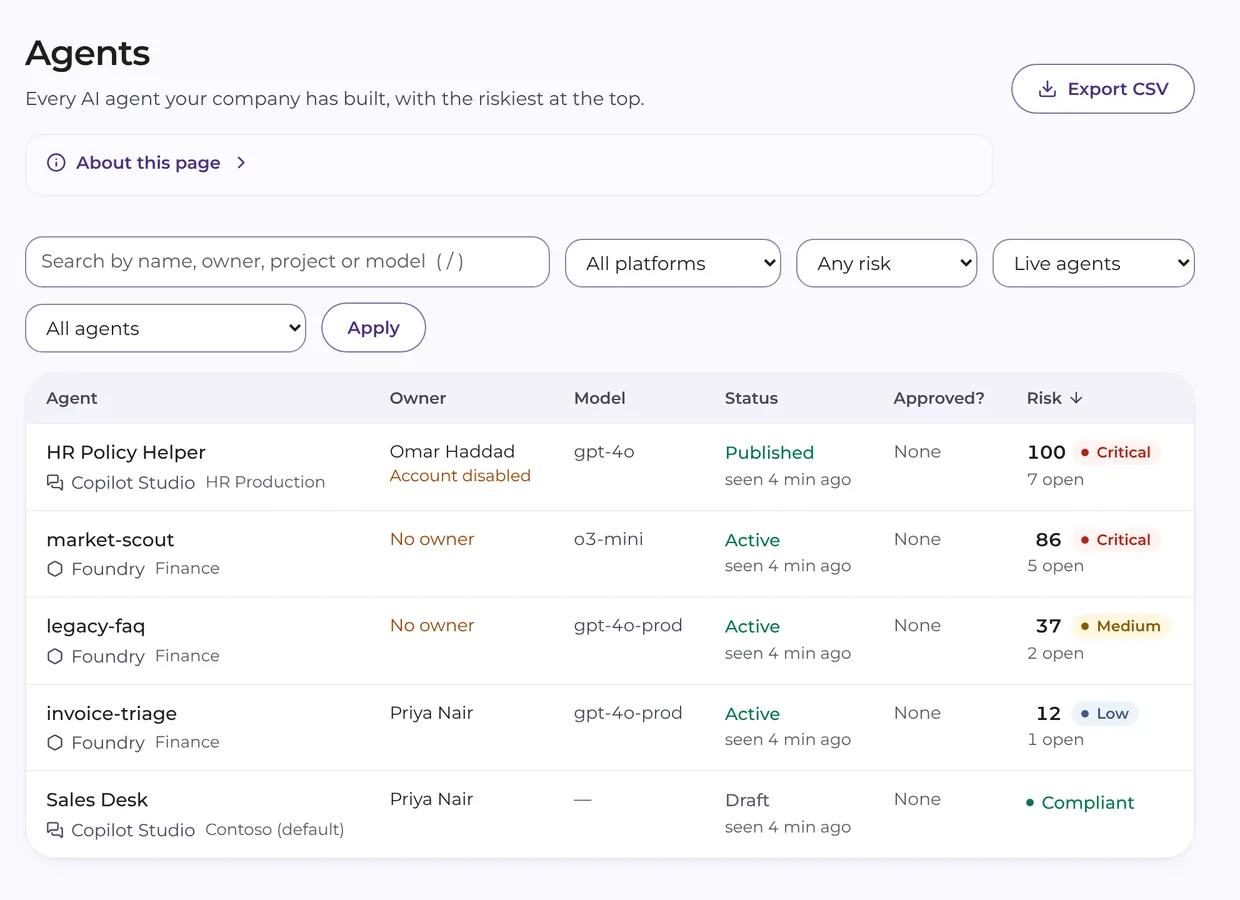
The Agents list, with each agent's owner, model, status, whether it was approved, and a risk score from 0 to 100 with the riskiest first.

Approve agents before they're built

  • Anyone can ask for an agent with a short form in plain language: what it's for, what information it uses and who will use it.
  • A reviewer approves it, rejects it or asks for changes. People can't approve their own requests.
  • Approved Foundry agents are created for you. Copilot Studio agents are linked once they're built.
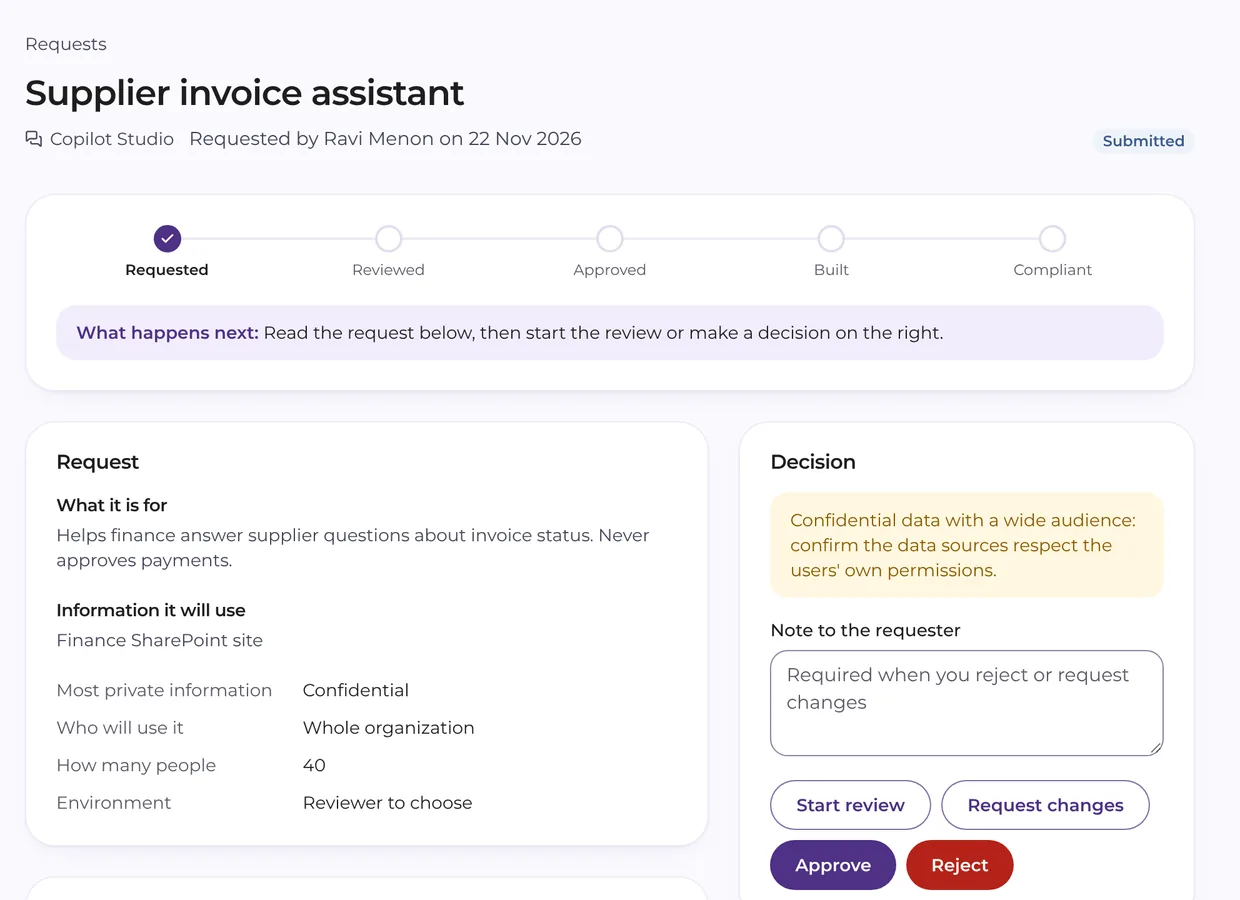
A request for a Supplier invoice assistant, showing its progress from Requested to Compliant, a 'What happens next' line, the request details and the reviewer's Approve, Request changes and Reject buttons.

Check each agent against clear rules

  • 13 ready-made rules, from anonymous access to agents nobody owns. Turn each on or off and choose how serious it is.
  • Each agent gets a risk score out of 100, so you know where to start.
  • Fix the problem, accept the risk for a set time with a reason, or block the agent until it's fixed.
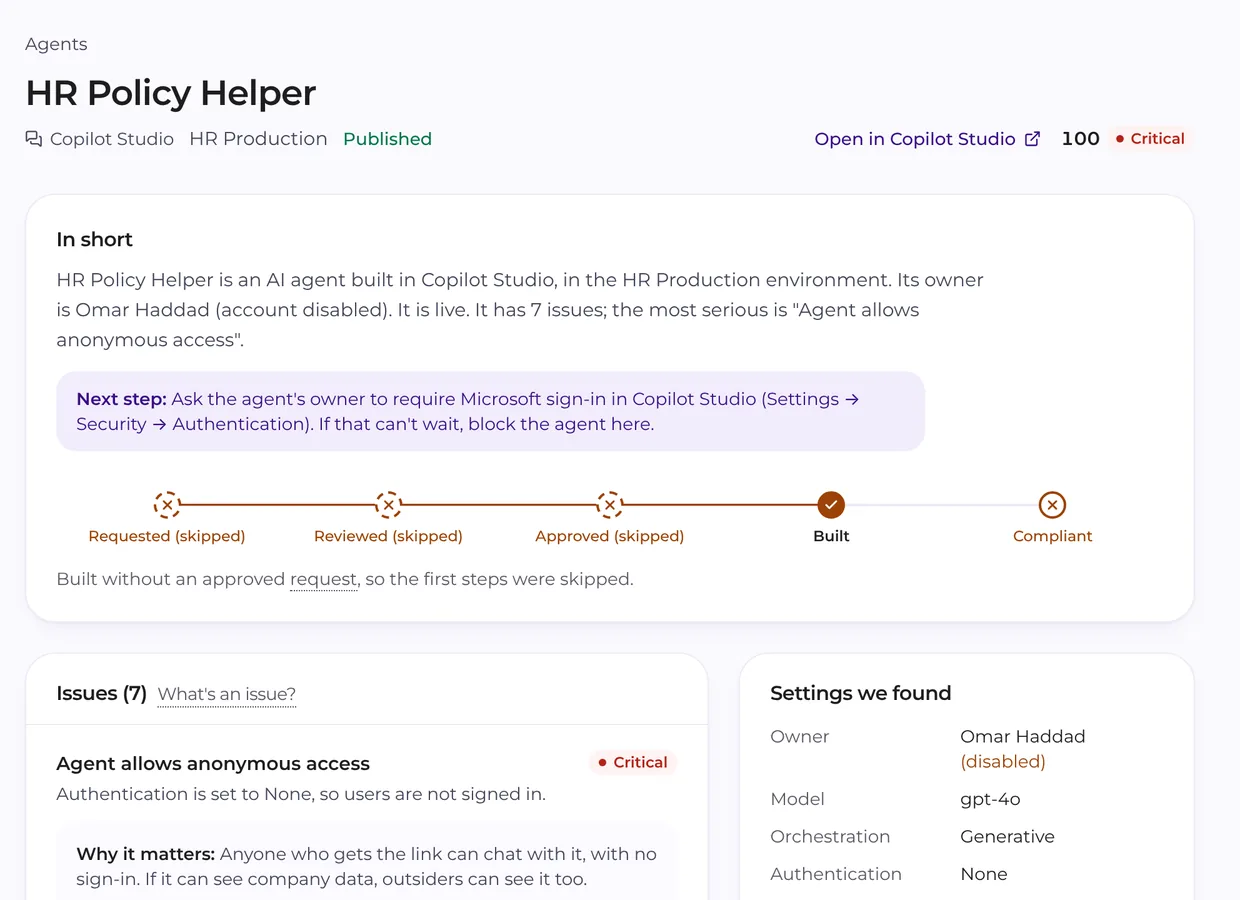
An agent's page with an 'In short' summary, a next step, and a list of issues, each explaining why it matters and what to do.

Track use, cost and every decision

  • How much each agent is used, and what your Foundry agents cost this month in your billing currency.
  • An activity log of who did what and when: approvals, blocks, accepted risks and changes to agents.
  • Export the agent list and the activity log to a spreadsheet for audits.
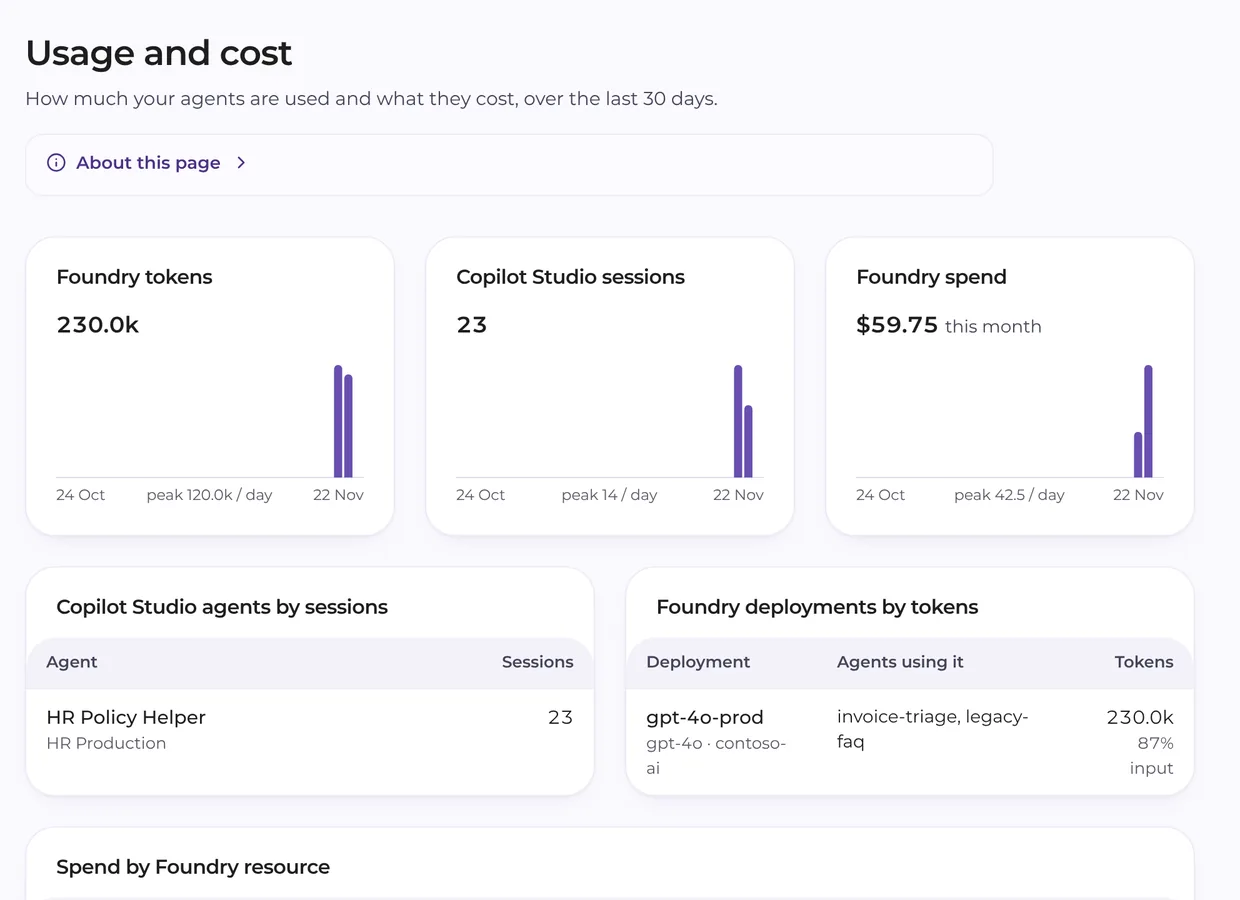
The Usage and cost page with Foundry tokens, Copilot Studio sessions and Foundry spend this month over the last 30 days.

And the answers your leadership and auditors ask for

Dashboards for 7, 30 or 90 days
Agents per environment, drafts, active agents and people using them, the most and least used agents, Copilot Credits per agent, Azure spend by service, and data processed per agent. Filter by platform or environment, or download it.
Inside or outside your country
Every agent marked inside or outside your home geography, including Foundry models deployed as Global that Microsoft may process anywhere.
A security scan for AI risks
Checks grouped by the OWASP Top 10 for AI applications: prompt injection exposure, actions without confirmation, secrets in instructions, safety filters switched off, sudden spikes in use.
Microsoft 365 licences that pay for themselves
Licences bought, in use and idle, the money on idle ones, cost per active user, and the return on Microsoft 365 Copilot using assumptions you set.
Maker, Checker, Approver
One, two or three review layers, with extra layers only for sensitive requests. Nobody approves their own request or signs two layers.
Mapped to the standards you answer to
EU AI Act, ISO/IEC 42001, NIST AI RMF, GDPR, UAE PDPL, Saudi PDPL, the UAE AI Charter and India's DPDP Act, with evidence you can hand to an auditor.


How an agent moves through the process

Every agent and every request shows where it is on this path, so anyone can tell what happens next.

  1. 1RequestedSomeone describes the agent they need.
  2. 2ReviewedA reviewer checks what it's for, what it reads and who will use it.
  3. 3ApprovedThe reviewer says yes. Foundry agents are created for you.
  4. 4BuiltThe agent exists and a scan has found it.
  5. 5CompliantIt breaks none of your rules, checked on every scan.

Getting started

No software to install. Each step is a guided click-through in the app, and Home keeps a checklist until you're done.

Want help setting up? Talk to Loyal Bytes
  1. 1A Microsoft administrator signs inYour Global Administrator signs in with Microsoft and allows the app for your company.
  2. 2Give it access to FoundryIn the Azure portal, give the app three roles on the subscriptions where your teams build Foundry agents. The app shows you which ones.
  3. 3Connect Copilot StudioA Power Platform administrator signs in once so the app can list your Copilot Studio agents.
  4. 4Run the first scan and invite your teamYour agents appear once the scan finishes. Colleagues sign in with their work account and you choose who reviews.

What it sees, and what it never sees

The app reads the settings of your agents, never the conversations people have with them. You can remove it from your tenant at any time in the Microsoft Entra admin center.

It can

  • List your Copilot Studio and Foundry agents and read their settings
  • Count how often each agent is used, and read Foundry cost
  • Check whether an agent's owner still has an active account
  • Block and unblock a Copilot Studio agent when an admin asks it to
  • Create a Foundry agent when a reviewer approves a request
  • Delete a Foundry agent, only when an admin chooses to

It can't

  • Read the prompts, conversations or files people send to agents
  • Read anyone's email, documents or other Microsoft 365 data
  • Edit how a Copilot Studio agent works
  • Change anything in Azure other than creating or deleting agents

Each company's data is kept separate. People sign in with their own Microsoft work account, and every action is recorded in the activity log.

Questions people ask

Do I need to know about AI governance to use it?

No. Every page starts with a short explanation, every warning says why it matters and what to do, and the Help page explains each term. Home tells you where to start.

Which Microsoft products does it work with?

Microsoft Copilot Studio (including agents published to Teams, SharePoint, Microsoft 365 Copilot and websites) and Microsoft Foundry (Azure AI Foundry) agents.

Who in my company uses it?

Owners and admins connect Microsoft and decide the rules. Reviewers approve or reject requests for new agents. Everyone else can ask for an agent and follow their request.

Can it change or delete our agents?

Only when one of your admins chooses to. An admin can block a risky Copilot Studio agent until it's fixed (nothing is deleted), or delete a Foundry agent. New Foundry agents are only created when a reviewer approves a request.

How up to date is the information?

The app scans your tenant automatically, every hour by default, and admins can start a scan at any time with Scan now.

Which compliance standards does it cover?

The EU AI Act, ISO/IEC 42001, the NIST AI Risk Management Framework, GDPR, the UAE and Saudi data protection laws, the UAE AI Charter and India's DPDP Act. Each is mapped to evidence the app collects. It supports your compliance team; it isn't legal advice or a certification.

What is the AI Worker catalogue?

100 ready-designed Microsoft agents, ten for each of ten departments: Copilot agents for everyday work and Copilot Studio agents that run whole processes. Loyal Bytes tailors each one to your systems and languages, deploys it in your tenant, and Agent Governance keeps track of it from then on.

Do we need the catalogue to use Agent Governance, or the other way round?

No. Each works on its own. Together, the agents you deploy and the ones your people build are all found, checked and tracked in one place.

How do we get started?

If your company already has access, a Microsoft Global Administrator signs in first and follows the checklist. If not, talk to Loyal Bytes and we'll set it up with you.

Put the right agents to work, and know about every one.

Browse the 100 agents, or connect your Microsoft tenant and see every agent, its owner and its risks after the first scan.